

byTrianzor

CloseDesk for Slack

Your month-end close reminders, in Slack

CloseDesk sends your daily close reminders to Slack, so overdue tasks don’t slip while people are busy elsewhere.

Add to Slack Free on every CloseDesk plan.

What it does

A daily summary in your channel

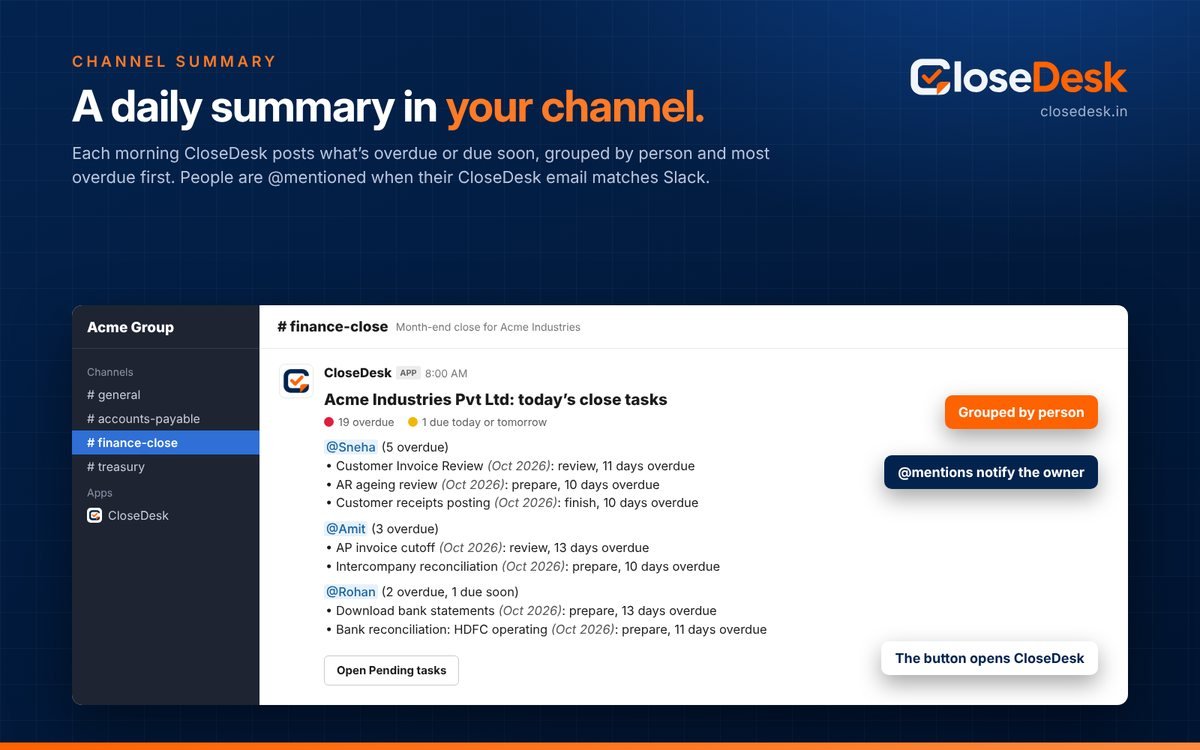
Each morning, for each company, CloseDesk posts what is overdue or due soon in the channel you choose, grouped by the person it waits on and most overdue first. Each line shows the task, the close, the step (prepare, review or approve) and how overdue it is.
@mentions

People are @mentioned in the summary when their CloseDesk email matches their Slack email, so Slack notifies them.

A direct message to each person

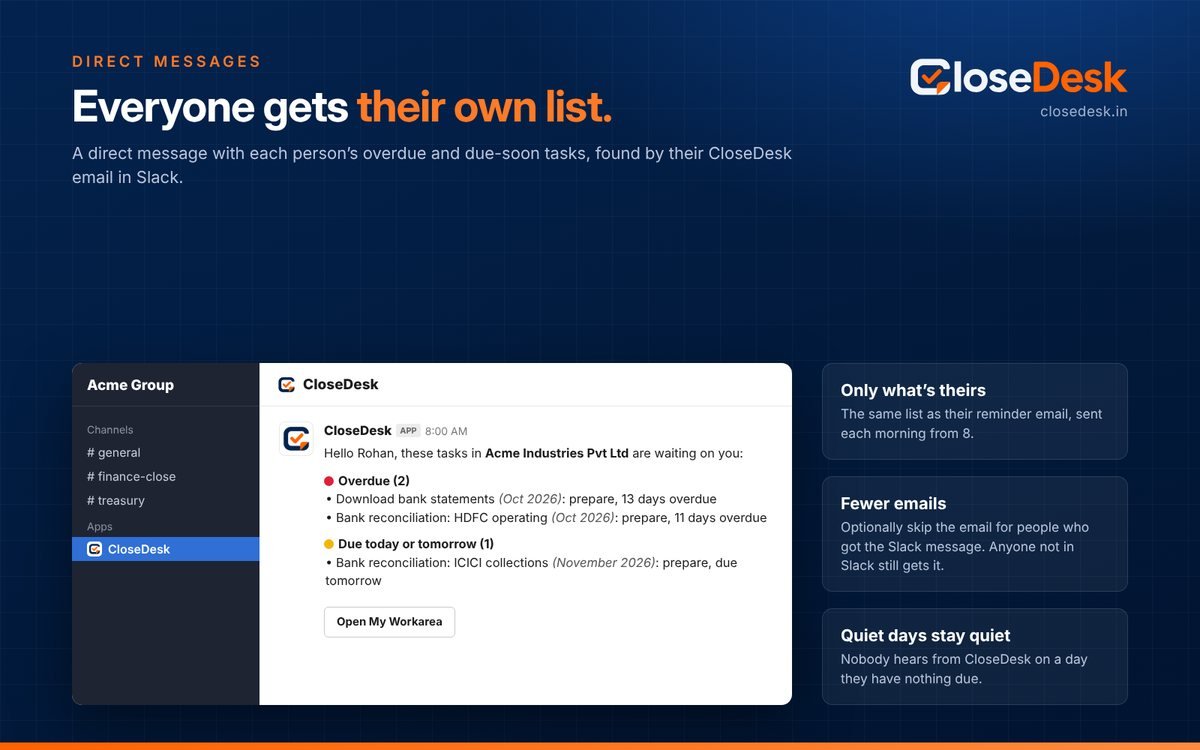
Everyone gets their own overdue and due-soon tasks, the same list as their reminder email. Nobody hears from CloseDesk on a day they have nothing due.

The CloseDesk Home tab

Open CloseDesk under Apps in Slack to see your own tasks that are overdue or due today, in every company, with a button to open My Workarea.

One summary, grouped by person

The summary carries a button that opens the Pending tasks list in CloseDesk, so the team goes straight from Slack to the work.

CloseDesk’s daily summary in a Slack channel, grouped by person with @mentions
A CloseDesk direct message in Slack listing one person’s overdue and due-soon tasks

Everyone gets their own list

Admins can stop the reminder email for people who got the Slack message. Anyone not found in Slack still gets the email.

Set it up in three steps

You need a CloseDesk account and to be an admin in it. Start free if you don’t have one yet.

  1. Add to SlackPress Add to Slack, choose your workspace and press Allow. Or start from Settings → Slack inside CloseDesk.
  2. Confirm in CloseDeskSign in to CloseDesk as an admin and confirm the workspace on Settings → Slack. It is connected once for your whole account.
  3. Choose what each company sendsPick a channel per company, turn the summary, @mentions and direct messages on or off, and send a test message.

For a private channel, type /invite @CloseDesk in it first. Messages go out each morning from 8 with CloseDesk’s reminder emails. Step-by-step guide: Get overdue tasks and reminders in Slack.

What CloseDesk can access in Slack

CloseDesk only posts messages. It doesn’t read your conversations or files, and it doesn’t keep your member list.

PermissionWhy CloseDesk asks for it
chat:writePost the daily summary in the channel you choose and send each person their direct message.
chat:write.publicPost in a public channel without first being invited to it.
channels:readList your public channels, so an admin can pick one in CloseDesk.
groups:readList the private channels CloseDesk has been invited to, so an admin can pick one of those.
users:readNeeded by Slack together with users:read.email, to look up one person by their email address.
users:read.emailFind a person by their CloseDesk email, to send their direct message, @mention them and show their own tasks on the Home tab.

What CloseDesk keeps

Your workspace’s name and ID, the bot token (encrypted), and the channel and choices for each company. Task details are sent to Slack only in the messages themselves.

Stopping it

An admin can change the choices or press Disconnect Slack on Settings → Slack at any time. If you remove CloseDesk from your Slack workspace, CloseDesk notices and stops sending.

Support: support.closedesk@trianzor.com · Privacy policy · Terms · Security

Close on time, together

CloseDesk brings checklists, sign-off, balance sheet reconciliations, GST and TDS recs, balance confirmations and reports into one place, with Tally and Zoho Books connectors.

Add to Slack See all features